

Home | About
Swim It is a virtual event where we are challenging you to swim 21 miles, the equivalent length of The Channel, throughout June and July. Unlike other events, you get to choose where, when and how you swim the distance.
When you sign up, you’ll receive a personalised JustGiving fundraising page where you can log your miles, share progress, earn virtual badges and collect donations from your supporters.
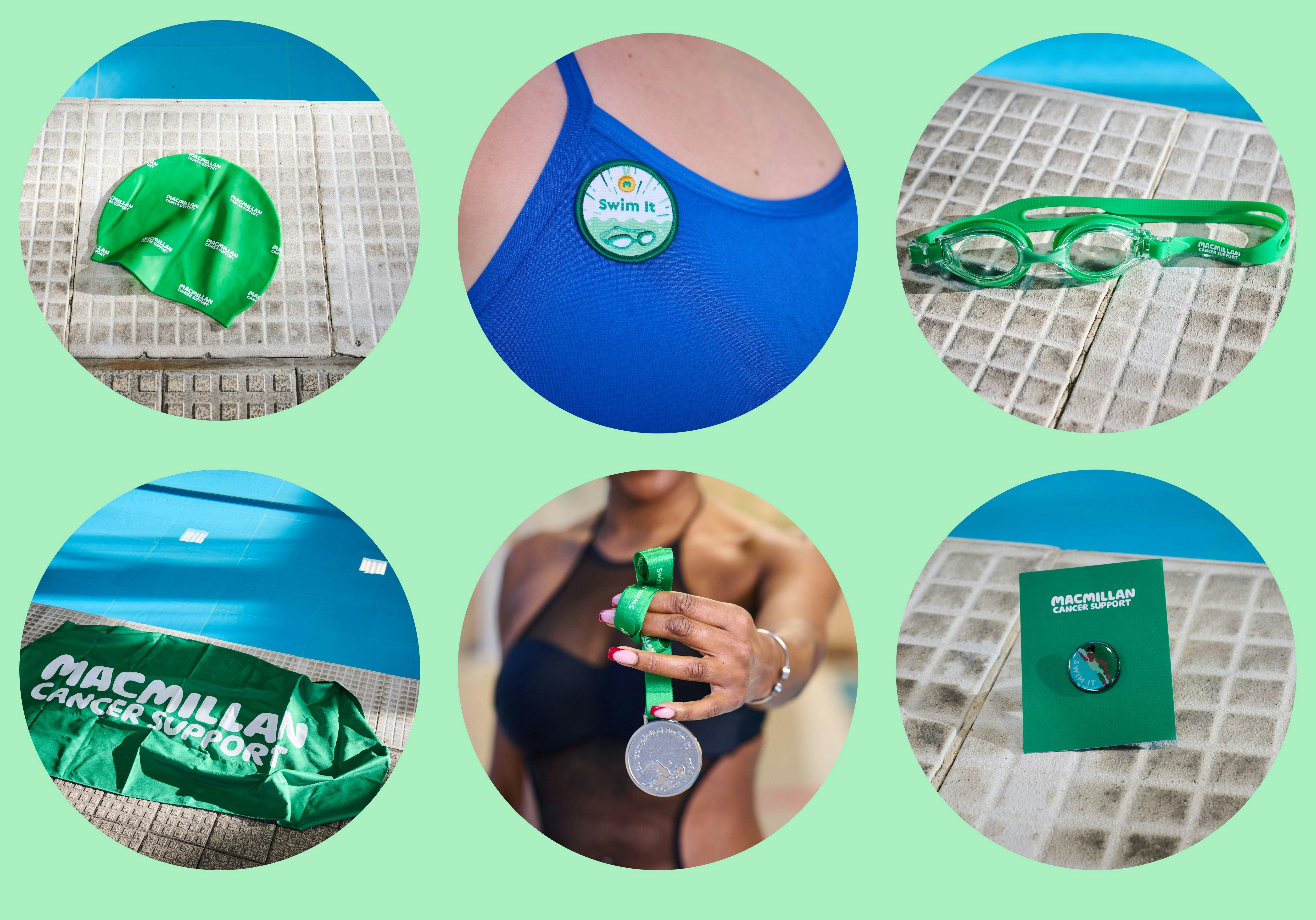
As a thank-you for your effort, we’ve got exclusive merch just for you - so you can Swim It in style! T&C's apply.
Raise £10 for your Macmillan swimming cap
Be one of the first 640 people to raise £250 for your Swim It badge
Be one of the first 290 people to raise £500 for your Macmillan goggles
Be one of the first 110 people to raise £750 for your Macmillan towel
Complete 100% of Swim It (21 miles) and raise £10 for your Swim It medal
Be one of the first 100 to complete 200% of Swim It (42 miles) and raise £10 for your Swim It pin badge
If you don't fancy swimming but would still like to show your support, you can donate to one of our Swim It fundraisers instead!
"In the water it gives you a chance to reflect on why you’re there, what you’re doing and who you’re doing it for. I'd say to anyone just do it, it carries you, if you swim one length, you can swim them all" - Nadio, Swim It participant

Swimming 21 miles is no small feat. That’s why we’ve built a range of resources to help you throughout the challenge which you can check out here.
Our thriving Facebook community is open between April and August. Connect with your fellow swimmers, share your story, ask questions and celebrate each other’s progress.
Here are some popular questions we get asked about Swim It. Our friendly Supporter Care team are on hand Monday to Friday 9:30-4:30pm to answer anything you can’t find below. Reach us on 0300 1000 200 or by emailing swimming@macmillan.org.uk.
Please get in touch with the JustGiving support team, who will be happy to assist you. It would be helpful if you could include a link to your fundraising page and details of the activity you’re trying to log.
What is Swim It?
Swim it is a virtual swimming event where we are asking you to swim 21 miles (the length of the English Channel), at your own pace, at your own time over 2 months and at a location of your choice. The event will be taking place from the 1st June to the 31st July. We will support you with every step (or length) of the journey and ask that you raise vital funds to help people living with cancer.
How do I register?
You can sign up online now at: Home Page - Macmillan Swim It
Registration opens on 1st April 2026. Simply complete the registration form on our website! You’ll then receive an email from JustGiving and an email from us to confirm you’re all signed up.
If you experience any difficulties signing up, please email swimming@macmillan.org.uk or call 0300 1000 200 (Monday to Friday, Monday to Friday, 9:30am to 4:30pm) for assistance.
Is there a registration fee?
No it is completely free to sign up to Swim It!
We encourage every participant to raise £250 to provide vital funds to support people living with cancer.
I want to share the registration link so that my friends / family can sign up too!
You are more than welcome to complete Swim It as a team, however everyone in the team will need to register individually for their own fundraising page. This is so we can send you emails about your challenge, and each person in the team can track their progress, as well as receive any incentive items should they meet the criteria.
Once you're all signed up, you can then link your pages together under one team on JustGiving. Log into your fundraising page, click edit page and create/join a team from there.
When will the event happen?
Start swimming in your chosen location on 1st June and make sure to get to that 21 miles and reach your fundraising target by the 31st of July.
If you complete and log your 21 miles on your page within the challenge months, and fundraise at least £10, you’ll receive your very own Swim It medal! And if you’re one of the first 100 people who complete 42 miles by the end of July, and have raise £10, you’ll receive a Swim It pin badge!
What distance is the challenge?
The Swim It Challenge is to swim 21 miles, approximately the length of ‘The Channel’ This equates to 33.8km and 1351.77 lengths of a standard 25m pool (rounded up to a full length).

Here is a breakdown of how many lengths you would need to do per swim, depending on how many swims you plan to do each week. We have based this on taking the full 8 weeks to complete the challenge.

Can I complete the challenge at various locations?
The challenge can be completed wherever you like, however please ensure your safety at all times by swimming in lifeguarded areas.
Do I need to train for Swim It?
The beauty of this event is that you’ll get stronger as you go, and there’s no need for extra training. You’ll be doing it at your own pace, in your own time. If you do want any extra training tips, click here to see our swimming training guides.
If you have any concerns about your health or fitness, please always speak to your doctor first.
Where can I get support if I need it during this challenge?
If you need support about being affected by cancer, our Macmillan Cancer Support Line offers confidential support to those living with cancer and their loved ones. If you are worried about money, work or treatment or just want to speak about whatever matters to you, we'll listen and support you. Call us for free on 0808 808 00 000.
I haven’t received a swimming cap, how do I get one?
Once you've raised your first £10, you'll receive your swimming cap (please note this can take up to 2 weeks to arrive in the post).
If you haven't received this after 2 weeks, please direct message us from the Facebook group, or email your address to swimming@macmillan.org.uk with the subject: 'Swim It – Swimming Cap', and we will get this to you as soon as possible.
Can I order an additional swimming cap (or other incentive)?
Unfortunately, our Swim It stock is limited so we can’t send additional products to you. Please see our T&C’s for more detail on incentives.
How do I enter the JustGiving Prize Draw?
To enter the JustGiving prize draw you need to have set up a JustGiving page and logged at least one swimming activity on your page. Doing this will automatically enter you into the prize draw and you will then be in with a chance to win a variety of prizes, including a Garmin Watch! The prize draw will run from 1st of June to the 7th of June 2026 (please read the terms and conditions).
Can I take part in Swim It from overseas?
Yes, absolutely! The beauty of Swim It is that you can do your swims in any location. Your JustGiving page allows you to accept donations from friends and family all over the world.
However, please note that we can only send incentive items to addresses within the UK.
Can I start the challenge late?
We will be encouraging everyone to start the challenge on 1st June. However, if you are joining the challenge later or have missed a few days, you can continue into August.
Is there an age limit?
Swim It welcomes all ages and abilities. Under 18s are welcome to take part but they’ll need an adult to register on their behalf as we can only communicate with an adult. Under 18’s should not register with their own details, and the Facebook group is strictly for supporters over the age of 18.
I’m pregnant can I still take part?
You are more than welcome to take part; however, we do ask that you please consult with your doctor or midwife to ensure that the challenge is suitable for both you and your baby. Please do also adapt the challenge according to your needs.
I have a health condition; can I still take part?
We do encourage that you contact your doctor for professional medical advice before starting the challenge as we want you to remain safe whilst you swim your miles.
How do I join the Facebook group?
Join our Facebook group here. This is a great place to meet fellow swimmers and share your top Swim It tips.
How is the Facebook group moderated?
Our Supporter Care team monitor the group intermittently Monday – Friday, 9am – 5pm.
Do I need to provide evidence that I’ve done the challenge?
No, however we do love to see your photos so make sure to share them on our Facebook group or tag us @MacmillanCancer.
What if I don’t complete the challenge?
The only thing that matters is that you challenge yourself and that you are doing something incredible to support people living with cancer. However much you achieve, we're so grateful for your support and for helping us do whatever it takes to help more people with cancer get the best care the UK has to offer, whoever and wherever they are.
I’ve completed 21 miles early and there’s still loads of time until the end of July
Congratulations on completing the distance so quickly! If you’ve logged the distance on your page and raised £10, you can expect a medal in the post from us at the end of July. If you’d like to keep going, there are bonus milestone badges that you can reach.
These go up to 200% so you’ll be swimming all the way back again! If you are of the first 100 people to complete 200% (42 miles), and raise £10, you’ll receive a Swim It pin badge!
What is my fundraising target?
Your target will automatically be set to £250, but you can change this to whatever you would like to aim for.
Do you have any fundraising rewards?
If you complete and log your 21 mile swim during the challenge months, and fundraise at least £10 on your page, you will receive a Swim It medal to wear with pride!
We have also got the following swimming goodies that you can earn as you fundraise – terms and conditions apply:
If you would prefer to opt out of receiving our rewards program, please email swimming@macmillan.org.uk.
Can I donate to my own fundraiser?
Absolutely! Donating to your own page is a great way to get your fundraising rolling, in fact, statistically it has been proven that self-donating helps to encourage donations from your supporters by up to 42%!
You’ll also earn your virtual “Self-Donate” badge on your fundraising page too!
Do I have to fundraise online?
Your fundraising page is a secure, quick and easy way to get donations and a great way to track your progress.
But if you would rather fundraise in a more traditional way, such as sponsorship forms, you’ll receive these in your fundraising pack and you can download more from our resource page.
How do I pay in money raised offline?
The best way to pay in your cash donations is to pay them into your bank account and then make a payment from your debit/credit card to your own JustGiving page.
By Post
Send a cheque with your name and event, made payable to ‘Macmillan Cancer Support’, to:
Swim It 2026,
Macmillan Cancer Support,
PO BOX 791,
York House,
YO1 0NJ
By Phone
Call us on 0300 1000 200 (Monday-Friday, 9:30am – 4:30pm) and we can take payment over the phone.
BACS Transfer
Send an email to fundraising@macmillan.org.uk for our bank details and your unique paying in code.
How do I add offline and cash donations to my fundraising page?
You can manually add any offline funds raised by following these simple instructions:
Log in to your fundraising page using your JustGiving sign in details at swimit.macmillan.org.uk
How do I raise money?
By setting up your Swim It JustGiving page, you'll be able to invite friends and family to sponsor you by sending them a link to that page.
We'll also send you a fundraising pack to help you get started, and you’ll receive regular emails with top tips and tons of advice. There is also loads of handy resources for our dedicated fundraisers on our website.
What is Gift Aid and can I add it to my donation?
Gift Aid is a great opportunity for donors to make their voluntary donations to Macmillan worth 25% more – without spending an extra penny. It enables charities like us to claim the basic tax that donors have paid on their donations back from HM Revenue & Customs (HMRC).
If every supporter agreed to Gift Aid it would raise hundreds of thousands of pounds more to support people affected by cancer.
To be eligible to add Gift Aid to your donation you must be a UK taxpayer and you must have paid or will pay an amount of Income Tax and/or Capital Gains Tax for the current tax year, that is at least equal to the amount of tax that all the charities and Community Amateur Sports Clubs (CASCs) that you donate to will reclaim on my gifts for the current tax year. Other taxes such as VAT and Council Tax do not qualify. The charity will reclaim 25p of tax on every £1 that you have given.
How can I let you know I changed my mind about hearing from Macmillan?
If you change your mind about hearing from us, you can stop receiving our updates at any time by emailing fundraising@macmillan.org.uk or calling 0300 1000 200. Please see our privacy statement for more information.
Are my personal details safe and secure?
JustGiving's top priority is to ensure that transaction and supporter data is kept secure at all times.
That’s why JustGiving maintains the highest possible standards of data security. It’s why we’ve implemented key international standards of best practice in online and data security, including:
MasterCard®SecureCode™
Verified by Visa (VbV)
Payment Card Industry Data Security Standard.
We take an active role in the overall reduction of identity theft and fraud on the internet by ensuring the security of our IT systems, personnel, and infrastructure.
Our employees are trained in all aspects of web application security, including infrastructure vulnerabilities, cross-site scripting, secure data storage, and using the software development lifecycle to maintain and improve security.
JustGiving has been certified PCI compliant by Trustwave, an official Visa Qualified Security Assessor. This means our systems and services comply with the Payment Card Industry Data Security Standard and that we actively protect our customers' identities, personal information and financial details.
We have lots of useful guidance about how to use your JustGiving page in our fundraising pack which can be found on this resource page when the challenge is live.
What is my Swim It JustGiving page?
This is where you can keep track of how many miles you’ve completed and your fundraising, all in one place. You can personalise it by adding your photo, your story, and regular updates.
It's where you'll start earning virtual badges for both your swimming and your fundraising. It’s easy to share your fundraising page with friends and family, so you can show off how you're getting on, and they can support you by donating.
What should I do if I’ve forgotten my username and password for my JustGiving page?
When setting up your JustGiving page you will have chosen a password - don’t worry if you've forgotten it!
You can check your emails from Just Giving to retrieve your login details, or head to the JustGiving Help & Support page for help logging into your account.
How do I track my distance?
It’s so motivating to see how far you’ve gone, and your supporters can also follow your progress and cheer you on. That’s why we’ve made it extra easy to track your distance through your fundraising page by logging your lengths.
Follow these simple instructions:
1. Count your lengths manually or with a waterproof fitness tracker for swimmers.
2. Log in to your fundraising page using your JustGiving sign in details at swimit.macmillan.org.uk
3. Scroll down to your “Latest Updates” and click the green button that says “Log fitness” (available from 1st June).
4. Enter the distance you've completed.
5. Click save and your page will automatically update with your new total.
When can I track my distance?
Distance tracking becomes available when the challenge begins on 1st June. Don’t worry if you can’t see it before then – it will automatically appear when you log in on the first day of the challenge.